
Starlink Mini: Roof Mount vs
Ground Deployment (2026)
One reviewer ran both setups for 6 months before picking a side. Here’s the actual trade-off — plus the 12V voltage-drop issue that causes random reboots, and why a $250 backup device still belongs in your kit even with Starlink mounted.
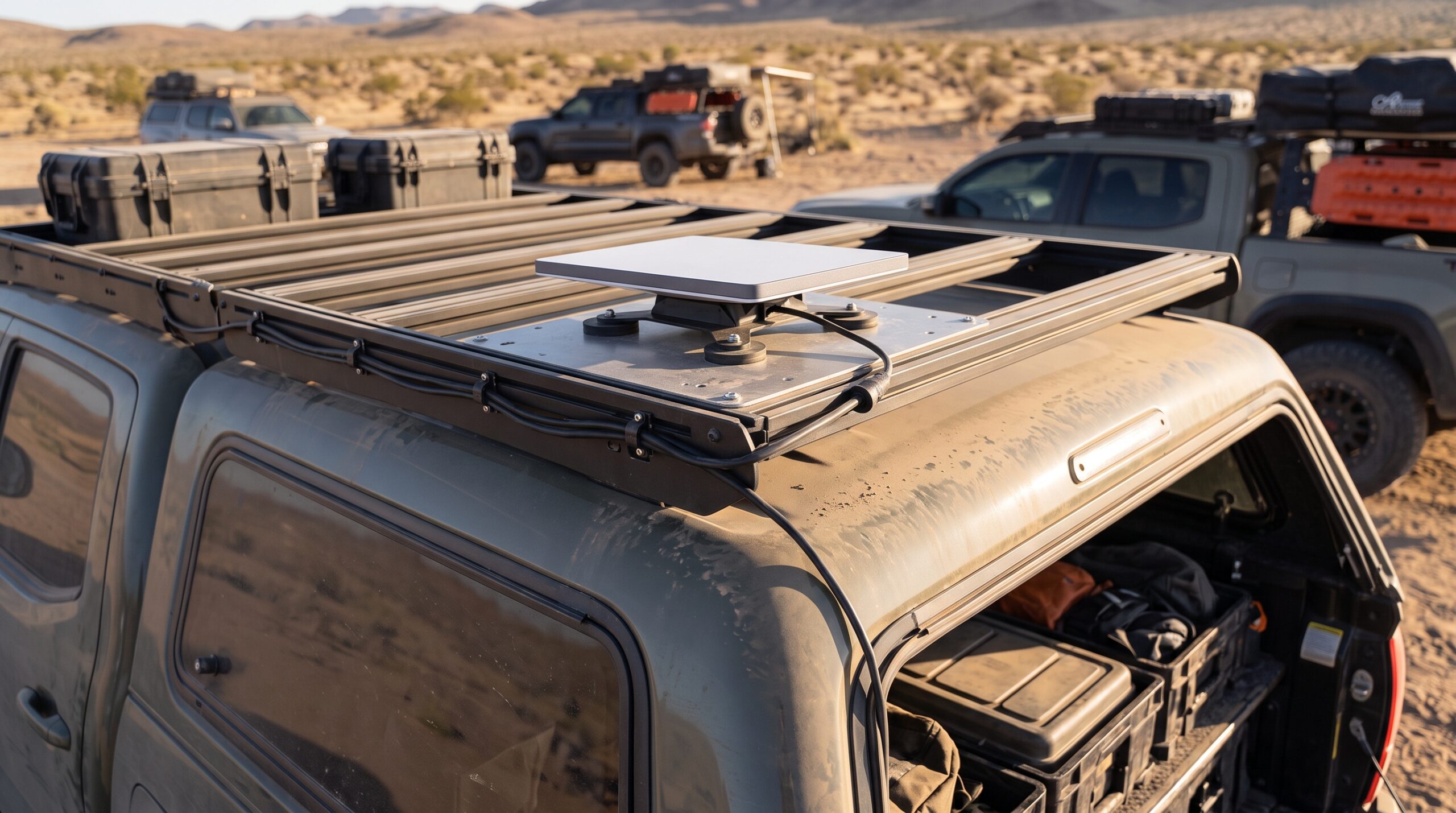
Mounting comparisons, the voltage-drop issue, and power draw figures below are drawn from documented long-term field reports (including a published 6-month test log), overlanding forum installation threads, and manufacturer specifications for the mounts and communicator devices referenced. Where sources conflict on power draw estimates, we present the range rather than a single cherry-picked number.
We covered the core “should I even get Starlink Mini” decision in our worth-it guide and the power budget math in our battery math guide. This one answers the question that comes right after you’ve bought it: where does the dish actually go?
The 6-Month Verdict: Roof Mount Wins for Permanent Rigs
That’s the clearest signal available: for a dedicated overlanding rig or van you live in full-time, roof mounting wins on pure convenience. No daily setup, no tripod to lose, no cable management ritual every time you park. But “wins for permanent rigs” isn’t the same as “wins for everyone” — ground deployment still has a real place, and the same source that recommends the roof mount also recommends pairing a portable unit with a power station specifically for the times you take the Mini away from the van.
Roof Mount vs Ground Deployment: The Honest Trade-Off
Roof Mount Wins When
- You’re in a dedicated rig or van full-time — zero daily setup
- You want to use Starlink while driving between camps
- Cable management is wired once, permanently, correctly
- Your parking spot reliably has clear sky above the vehicle
Ground Deployment Wins When
- Your parking spot is obstructed but a nearby clear spot exists (the 50ft included cable reaches it)
- You want the dish available away from the vehicle entirely
- You’re not ready to commit to a permanent roof installation
- You move between multiple vehicles or setups
That flexibility is worth building into a roof-mount setup too, not treating as an either/or choice. The most experienced installers document both: a low-profile permanent roof mount for daily use, plus the ability to unclip and ground-deploy on the rare obstructed site — some build a dedicated “entry box” specifically so switching between the two takes seconds, not a rewiring project.
The Power Problem That Catches Roof-Mount Installers
Multiple installers report the same specific failure: powering the Mini directly from a 12V source causes random reboots due to voltage drop over cable runs. The fix documented in the field is a step-up voltage converter (12V to 36V) placed inline — not a full rewire, just one additional component. If your Starlink keeps rebooting on a roof-mount install and you’re running straight 12V, this is very likely why.
| Mount Type | Documented Power Draw | Notes |
|---|---|---|
| Stationary roof mount, clear sky | ~30W steady | Runs directly off 12V/24V aux battery per most installer reports |
| Portable/ground, mixed use | 25-40W | See our full battery math guide for route-day budgeting |
| 120V AC adapter (included) | N/A — converts to 30V DC | No voltage-drop issue reported with the stock AC path |
The 2 Mounting Products That Solve Real Fitment Problems
1. Best for Grooved Truck Roofs: Flagpole Buddy Mini Flat Mount
- 100 lbs holding force — rated to stay put at highway speeds
- Designed specifically for grooved/stamped roof panels where standard flat mounts fail
- Installs in under 2 minutes, no drilling or tools required
- 3D-printed PETG construction, low profile
- If your roof rack fully covers the steel panel, a magnetic mount may have no flat surface to grip — a rack-clamp mount is the correct alternative in that case
2. Best Protection for Transport: EVA Hard-Shell Case
- Shockproof shell for trail vibration and impact during transport
- Better weight-to-protection ratio than heavier rigid alternatives, per field comparison
- Fits the dish plus cables for grab-and-go ground deployment
- Adds bulk if your plan is strictly permanent roof-mount with no removal
Why You Still Need a Backup Comms Device
Starlink Mini needs power, a clear sky view, and no equipment failure to work. That’s three points of failure a dedicated satellite communicator doesn’t share — it runs on its own battery, uses a different satellite network (Iridium), and is purpose-built for exactly the moment your primary system fails.
Garmin inReach Mini 2
- 14 days of battery life in 10-minute tracking mode — independent of your vehicle’s power system
- Interactive SOS routes to Garmin’s 24/7 emergency response center
- Two-way text messaging via global Iridium satellite network
- TracBack routing helps retrace your path if you get lost
- Small enough to carry on your person, separate from the vehicle entirely
- Requires an active subscription plan starting around $14.95/month
- Text-only messaging — not a data/browsing replacement for Starlink
The distinction matters: Starlink Mini is your connectivity and comfort layer — browsing, video calls, work from camp. The inReach Mini 2 is your safety layer — it works when Starlink physically can’t, because it doesn’t share any of the same failure points. Serious overlanders running remote routes carry both, not one or the other.
Which Setup Fits Your Rig?
Match your situation to the right configuration:
The Gear Pulse Verdict
For anyone living in their rig or overlanding regularly, a permanent roof mount is the documented winner — six months of real field use settled that question. But build in the ground-deployment option anyway: the included 50ft cable exists specifically so an obstructed parking spot doesn’t kill your connectivity for the night.
If you’re wiring a roof mount to 12V and getting random reboots, don’t assume the dish is defective — check for voltage drop first and add a step-up converter before troubleshooting anything else.
And regardless of your mounting choice: Starlink Mini is not a safety device. It needs power and clear sky to function. A Garmin inReach Mini 2 or equivalent satellite communicator is a genuinely separate layer that keeps working when Starlink can’t — carry both if your routes go anywhere remote enough that a rescue call actually matters.
Ready to Mount and Back Up Your Connectivity?
Check current pricing on mounts, cases, and backup communicators.
Shop Starlink Accessories on Amazon →Related Articles on The Gear Pulse
→ Starlink Mini Power Draw: The 12V Battery Math Before You Go
→ Is Starlink Mini Worth It for Overlanding? The Real Monthly Cost
Pricing and specifications sourced from manufacturer listings and documented field reports as of August 2026 and subject to change. Always verify mount compatibility with your exact vehicle roof type before purchase. Satellite communication devices are regulated in some jurisdictions — know your local laws before use. TheGearPulse.com earns a commission on qualifying purchases through Amazon Associate links (ID: suprimely0b-20).